Superadmin Guide: Onboarding & Navigation
The Super Admin operates at the platform level to manage the AgroOps multi-tenant platform and oversee all registered agribusiness companies.
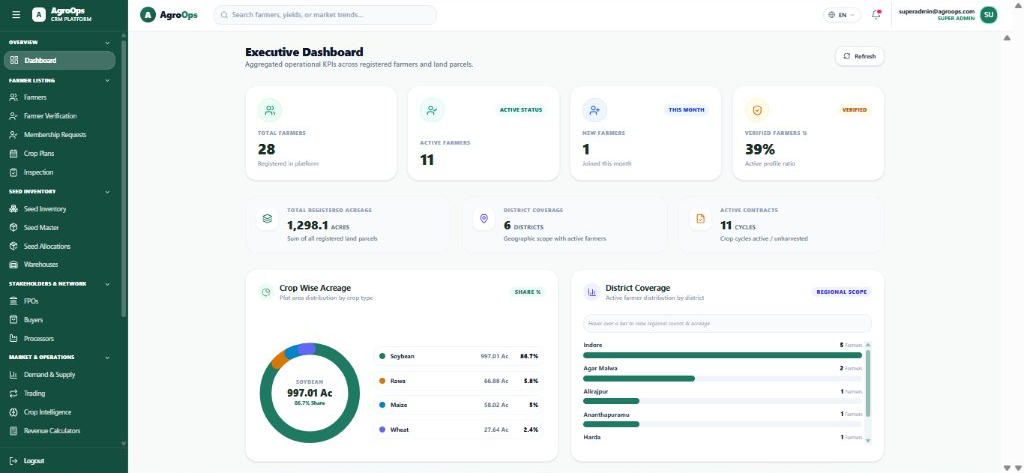
Important Role Distinction: The Super Admin has platform-wide authority across all tenants. This role is responsible for platform infrastructure, licensing, and tenant creation—not for day-to-day warehouse dispatches or village field visits.
1. Key Responsibilities at a Glance
| Operational Area | Super Admin Responsibilities |
|---|---|
| Company Management | Onboard, activate, monitor, and suspend company tenants. |
| Subscription Management | Assign subscription plans (FREE, STANDARD, ENTERPRISE) and enforce tenant resource limits. |
| User Management | Manage platform-level administrators, view cross-company user directories. |
| Role Management | Configure global system roles, maintain standard permission templates. |
| Master Data | Maintain shared global botanical crop lists, geographical reference boundaries. |
| Security & Audit | Monitor platform access, review cross-tenant audit logs, control sensitive decryption. |
| Platform Monitoring | Track active farmer counts, platform acreage, system health, and storage utilization. |
2. Onboarding a New Company (Tenant)
In AgroOps, every agribusiness, cooperative, or enterprise operates within an isolated workspace called a Company Tenant. All farmers, crop plans, land parcels, and financial records remain completely private to each tenant.
Step-by-Step Onboarding Flow:
- Log in to your AgroOps workspace with your Super Admin credentials.
- In the left navigation menu, expand Super Admin and select Companies (or navigate to
/superadmin/companies). - Click the + Add Company button.
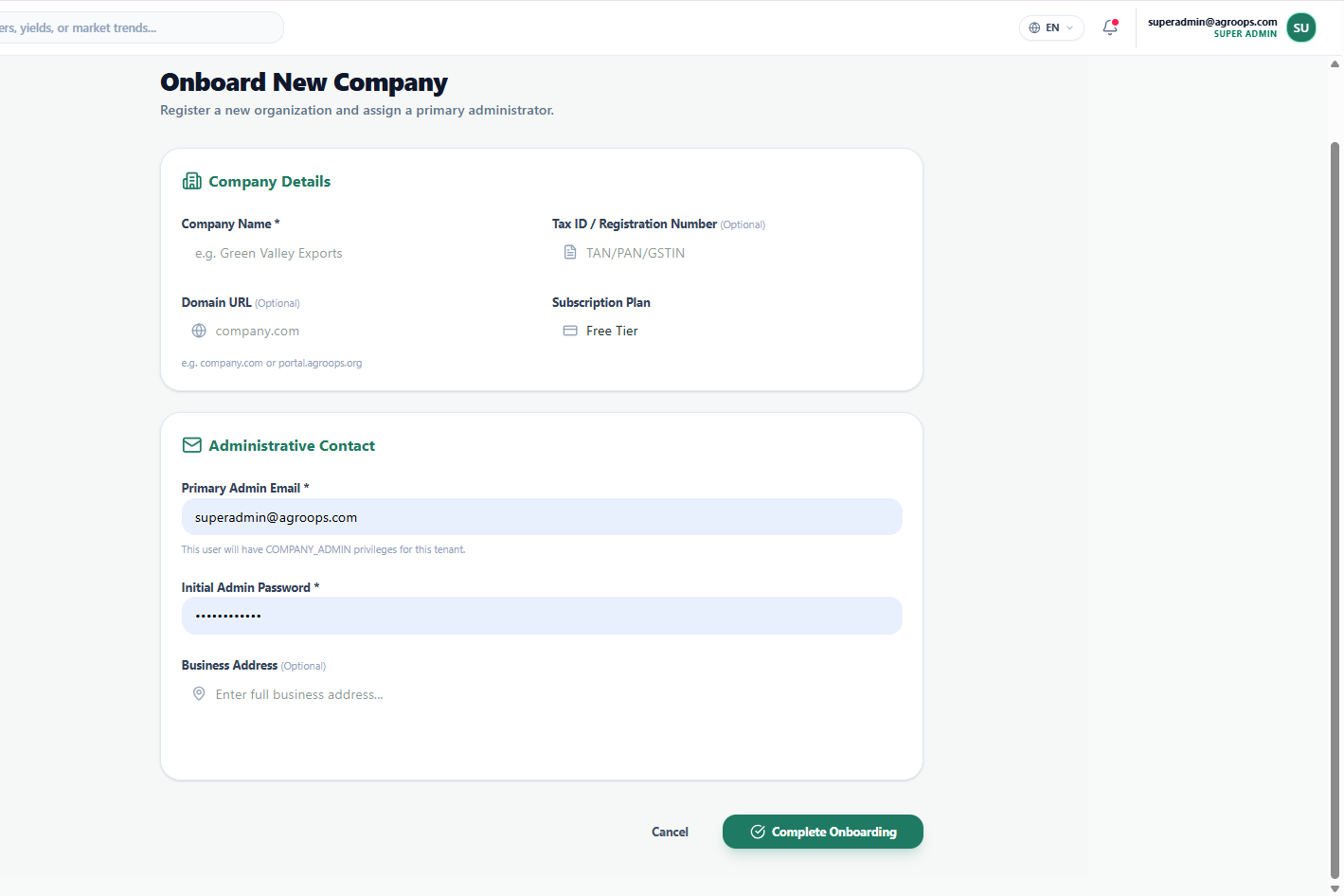
- Complete the tenant profile:
- Company Legal Name: Official registered name of the agribusiness or cooperative (e.g., Kisan Vikas Agro Producer Co.).
- Tax ID / GSTIN / CIN: Official government registration number.
- Allowed Email Domain: The corporate email domain (e.g.,
kisanagro.org). Any user registering with this email domain will automatically belong to this organization. - Subscription Plan Type: Choose the license tier:
FREE: Trial version for pilot projects.STANDARD: For mid-sized FPOs and cooperatives with up to 5,000 farmers.ENTERPRISE: Full feature tier with custom limits, API integrations, and priority support.
- Initial Company Admin Email: Email address of the primary executive who will manage this company.
- Temporary Password: A secure initial password. The admin will be prompted to reset this upon first login.
- Registered Operating Address: Physical headquarters or office address.
- Click Save Company.
- AgroOps automatically initializes the tenant workspace, seeds standard roles, and dispatches an automated welcome activation email to the Company Admin.
3. Subscription & Tenant Limit Management
As companies grow, the Super Admin can adjust subscription quotas from the company detail page:
- Farmer Cap: Maximum number of farmers permitted under this organization.
- Acreage Quota: Maximum registered acreage across all land parcels.
- Warehouse Storage Limits: Maximum input and seed storage capacity.
- Status Controls: Mark a tenant as
ACTIVE,TRIAL, orSUSPENDED.
4. Platform Role Governance
AgroOps provides built-in system role templates that the Super Admin governs globally:
- Company Admin: Tenant-level authority to configure employees, warehouses, and policies.
- Production Manager / Agronomist: Manages seasonal crop plans, seed catalogs, and field advisories.
- Warehouse Manager: Manages seed inwarding, quality checks (QC), lot batching, and stock dispatch.
- Field Officer: Mobile PWA operator managing farmer registration, document collection, and seed handover.
- Farmer: Self-service profile for land records and crop status.
Detailed permission matrices and technical codes are maintained in the Access Control & Permissions Reference.
5. Platform-Wide Navigation & Live Metrics
The central workspace delivers real-time operational KPIs across all active agribusiness tenants:
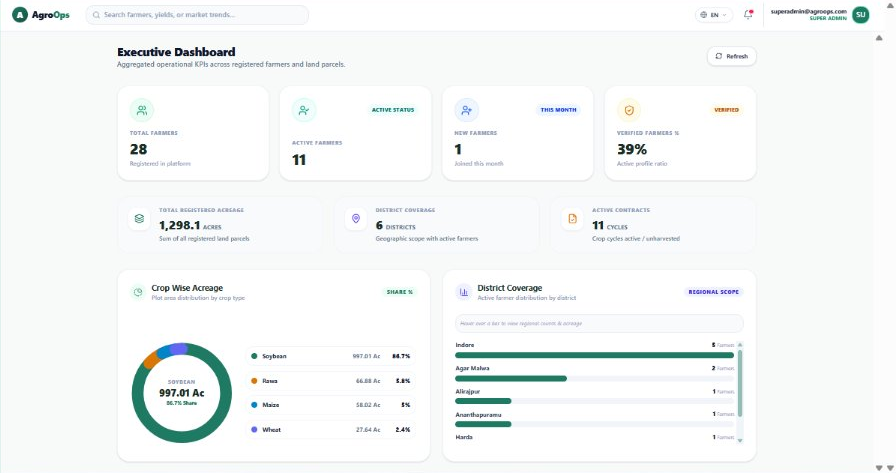
- Total & Active Farmers: Live count of registered and active farmer profiles across all tenants.
- KYC Verification %: Ratio of farmers with verified identity and land records.
- Registered Acreage: Total farm land across all registered parcels.
- District Coverage: Geographical reach of active farming operations.
- Crop-Wise Acreage: Visual distribution of primary crops (Soybean, Wheat, Maize, etc.).